Notice: This page is still under development and currently being built. It is not yet intended for the public and will still change in content and appearance.
 For iPhone, iPad & Mac
Tasks, bugs and ideas move as cards from Open to Closed. Works offline, syncs via your private iCloud, no account needed.
A Kanban board and a bug tracker in one app.
Drag a card to the right, and the status follows.
See it →Severity, steps, version and build on every bug.
See it →New items land in Open; sprints are there if you need them.
See it →Support, client work, renovation: a title is enough.
See it →A title is enough. Add the rest when you need it.
Every issue is a card, every column a step. Tap the points in the picture.
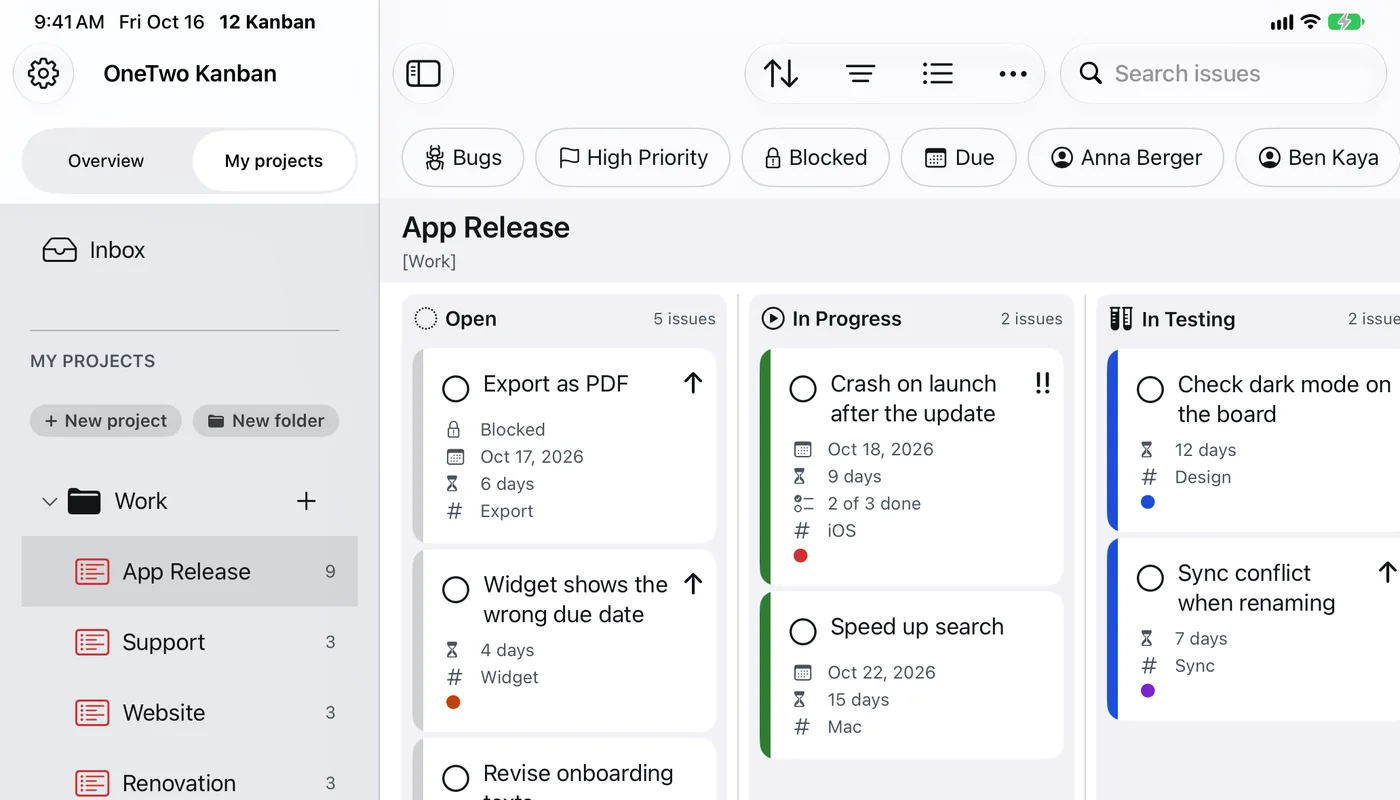
The sidebar groups projects into folders, with the overview on top.
One tap shows only bugs, high priority, blocked or due items, or one person.
Each column shows how much it holds. With a WIP limit it reads “2 of 3”.
Due date, processing time, subtasks, tags and color mark.
A lock shows that another issue has to be finished first.
Searches titles, comments, subtasks and attachments.
Kanban has no fixed sprints: as soon as something is done, the next item starts.
Real screens from the app with made-up sample data. Pick your device, swipe through and tap an image to see it large.
The Mac images are drawn for now. Layout and terms match the app; real screenshots will follow. The Mac has one neutral color scheme and no scanning.
The demo runs entirely in your browser. Nothing is sent to a server.
Pick an example and try the board. A simplified simulation with fictional issues.
In Progress has a WIP limit of 3 here. A fourth card triggers a warning.
Tiles with an arrow show the feature in a picture.
Only bugs, high priority, blocked or due.
See it →Backlog by release, sprints with a goal. Never required.
See it →Bugs, blocked and overdue across all projects.
See it →On iPhone and iPad, each light and dark.
See it →Photo, scan, text and sketch right on the issue.
Story points, remaining work, time tracking, history.
My Day on your Home Screen.
JSON, Markdown, text, PDF and backup.
Everything stays on the device. On the Mac also as an encrypted file, for example on a USB drive.
iPhone, iPad and Mac stay in step via your private iCloud. Offline, you simply keep working.
Same issue, two devices, two versions? The newer one doesn’t simply win. Try it:
Today, 10:15
Today, 10:22
No ads, no analytics, no AI services.
Face ID, Touch ID or passcode, with auto-lock.
Notifications and widgets without issue titles, if you like.
Details are in the privacy policy.
One-time · No subscription · No in-app purchases · No ads
Pay once and use the app with no recurring or hidden costs.
For one person on their own devices: software projects, support, client work or renovation. There are no team features and no shared editing.
Yes. Columns show the stage, cards show the work. New items land in Open, and you drag them to the right as things progress.
“Work in progress”: how many issues a column should hold at once. Above that, the app warns you or asks for a reason. It never blocks you.
The app asks for the resolution, such as Fixed, Duplicate or Not a Bug, and sets remaining work to 0. After a while the card leaves the board but stays in Completed and in search.
OneTwo Todo is a to-do app. OneTwo Kanban is built for projects: custom columns, WIP limits, issue numbers, bug analysis, releases and sprints.
There is no exact date yet. This page will be updated as soon as OneTwo Kanban is in the App Store.